What is BIMI and how it puts your logo in the inbox
BIMI is the DNS standard that shows your brand logo next to authenticated email in Gmail, Apple Mail, and Yahoo - a trust signal recipients see before they open the message. It only works once DMARC is at enforcement, and SecRift checks every piece.
A recognizable logo beside a message tells recipients it really came from you, and BIMI is how you earn that spot. It isn't a security control on its own - it's the reward for getting email authentication right, and a signal that raises trust and open rates. This guide explains what a BIMI record is, how it works, where it breaks, and how SecRift checks yours.
What is BIMI?
BIMI stands for Brand Indicators for Message Identification. It is a DNS TXT record, published at default._bimi.example.com, that points supporting mailbox providers to a logo they can display next to your authenticated messages.
A basic record looks like this:
v=BIMI1; l=https://example.com/logo.svg; a=https://example.com/vmc.pem
The l= tag is an HTTPS link to your logo as an SVG file, and the optional a= tag links to a certificate that proves you have the right to use the mark. Providers only render the logo when the message already passes DMARC at enforcement, so BIMI sits on top of your existing email authentication rather than replacing any of it.
How BIMI works
BIMI has three moving parts, and a provider checks each one before it shows anything:
- The DNS record. When a message arrives, a supporting provider looks up
default._bimifor your domain, reads thel=logo URL, and reads thea=certificate URL if present. - The logo. The image at
l=must be an SVG in the SVG Tiny Portable/Secure profile - a locked-down subset with no scripts, animations, or external references, so it renders safely inside a mailbox. - The certificate. The
a=link points to a Verified Mark Certificate (VMC) or Common Mark Certificate (CMC), an X.509 certificate issued by an approved authority that confirms the logo belongs to you.
The gatekeeper is DMARC. A provider only displays the logo for messages that pass DMARC with a policy of quarantine or reject. Gmail and Apple Mail additionally require a valid VMC, while Yahoo and AOL will show a logo without one. If any link in that chain is missing, the message still arrives - it just arrives without the logo.
Why BIMI matters
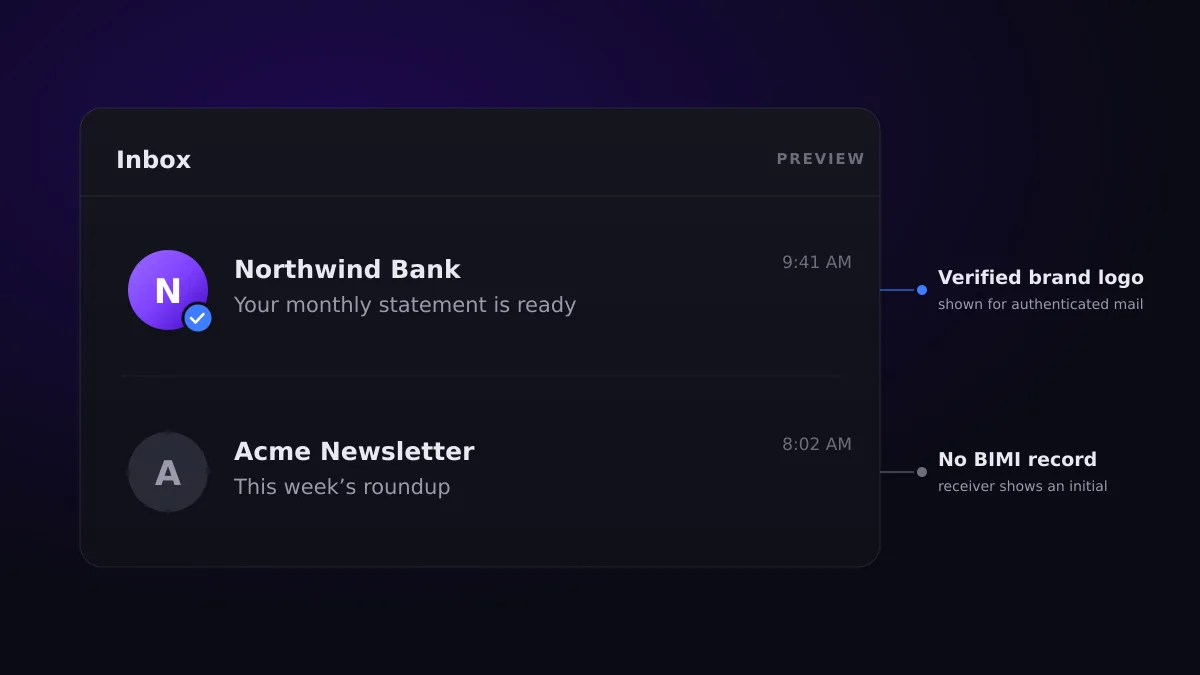
BIMI turns correct email authentication into something your recipients can actually see. A logo in the inbox is an immediate trust cue: it helps people recognize genuine mail at a glance, and it makes a look-alike message that can't display your logo stand out. In practice that tends to lift open rates and reinforce the brand you've invested in.
It also rewards the hard work you already did. You can't publish a working BIMI record until DMARC is at enforcement, so BIMI gives teams a concrete, visible reason to finish the move from p=none to reject. The logo is the payoff for locking down your domain.
Because BIMI is optional, a domain that doesn't publish a record loses nothing - there's no penalty for skipping it. The value is entirely on the upside.
Common BIMI mistakes
- Publishing BIMI before DMARC is enforced. With DMARC at
p=none, no provider will show the logo, no matter how perfect the record is. - The wrong image format. BIMI requires SVG Tiny P/S specifically. A regular SVG, a PNG, or an SVG with scripts or animations is rejected.
- A logo that isn't reachable. If the
l=URL is served over plain HTTP, returns an error, or is too large, providers can't fetch it. - No VMC where one is required. Without a valid certificate, Gmail and Apple Mail won't display the logo even when everything else is correct.
- An expired or mismatched certificate. A VMC that has lapsed, chains to an untrusted authority, or doesn't cover your domain fails validation.
- Multiple records or bad syntax. A domain must publish exactly one valid BIMI record - duplicates or malformed tags make it unusable.
How SecRift checks BIMI
SecRift reads your published BIMI record and the assets it points to, then breaks the result into six findings:
- Record publication - confirms exactly one
v=BIMI1record exists atdefault._bimi. Multiple records are flagged, and a domain with no record is treated as not applicable rather than penalized. - Syntax - validates the record structure: a required
l=logo URL served over HTTPS and ending in.svgor.svgz, plus an optional, well-formeda=certificate URL. - DMARC prerequisite - confirms DMARC is at enforcement for both your domain and its organizational domain, because a logo never shows without it. This is scoped to the BIMI-specific gap and doesn't duplicate the dedicated DMARC scan.
- Logo accessibility - fetches the
l=URL over HTTPS and checks that it returns a valid SVG within the size limit, over a safe connection. - Logo format - inspects the SVG against the SVG Tiny P/S profile, flagging scripts, animations, external references, or a missing profile declaration that certificate authorities reject.
- VMC certificate - when an
a=URL is present, validates the certificate chain to a trusted anchor, its dates, the BIMI extended key usage, and that it covers your domain.
Each finding comes with a plain-language summary and, where something is wrong, one concrete fix. SecRift reads only public DNS and the assets you publish, so it sees what a supporting mailbox provider would - and because the logo is optional, a domain without BIMI is simply marked not applicable. It does not compare the mark embedded in the certificate to your logo image, since that binding is out of scope.
BIMI sits on top of email authentication, so a domain at DMARC enforcement - backed by a clean SPF setup - is the prerequisite before a logo will ever appear.
Run a free scan on any domain at secrift.com and see your BIMI posture in seconds.